graeme beck pty ltd - camera & edit facilities
How to convert
30fps to 25fps
The White Paper
Convert the Canon 5D MKII from 30fps to 25i/p in smooth motion with the reverse
3:2 'pull down' method.
The result is smooth motion and lip sync without creating additional pixels, artifacts or any sound pitch changes.
30p is best converted to 25fps via a reverse of the standard 2:3 'pull down,' to a 2:3 'pull up.' No pixels are recreated and the result is smooth motion, lip sync and without any pitch change.
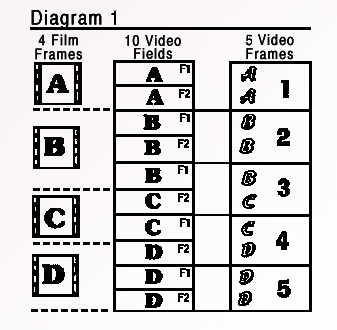
Standard 2:3 'pull down'
2:3 'pull down' is the process for transferring film to Television in the
United States and Japan.
The Hyper 35 camera uses the reverse of this process where 30p is 'pull up' to 25i/p resulting in 2 progressive frames followed by 3 interlaced frames. When viewed on an interlaced monitor the results are vastly superior to any other method of conversion.
How to
do it
(1)
The 3:2 'Pull up' method
The actual process is a little tricky, but in Premiere CS4 it is as follows.
(FCP to follow)
Open a 60i timeline and import your 30p files into the timeline. 'Upper field' if going to dub to HD and lower field if going dub straight to SD. (Syncing of rushes and any grading is best performed in a 30p timeline and then cut and pasting the clips into a 60i timeline)
Right click each clip in timeline and select 'interlace consecutive frames.' Dub to whatever codec required in a 25i file. No need to change any file interpretations.
This method gives the smoothest motion of 2 progressive frames followed by 3 interlaced frames. It is chalk and cheese difference when viewed on an interlaced monitor.
For HD, Mpeg 2 gives a good universal conversion format and at a constant bit rate of 38mbs comes in just under the file size of the original clip. We can not see any loss in comparing the files. File size is not a problem in a Windows system but with Macs, file size needs to be kept under 4 gigs.
The 30p to 25i/p process in HD or SD both take a little over 4x real time on an 8 core i7 processor. Multi processors have little or no effect on the speed of the conversions. Going from a new Mpeg 25i HD timeline to a SD or DV file is quick and we can see no difference in a file struck direct from the original 30p HD timeline.
Electricfilms offer this service.
(2) Quicker variation of above
A quicker variation of the above where the computer processing is just about real time can be performed, although the results aren't quite as good as (1) when view on an interlaced monitor they are superior to a frame based blend.
Put the 30p files in a 60i (upper or lower field timeline does not make a difference and there is no need to change any file interpretations) and right click each clip in timeline and select 'interlace consecutive frames.' Dub to 30i HD (Mpeg 2 50 mbs gives good results).
Open a 30i timeline and import new file. Dub to a 25i timeline in SD or HD. Again, Mpeg 2 is a good universally accepted codec.
This result is a quicker process than (1) and results in every frame being interlaced. When viewed on an interlaced monitor is still superior to a frame based (blended) conversion but not quite as smooth as (1).
When viewed on a progressive monitor, (1) & (2) look the same as a blended frame based conversion.
Other Conversion methods
(3) Progressive
to progressive - blended frames
Most computer programs do this method. We find the process a little jerky
especially when viewed on an interlaced monitor. The fifth frame usually jumps.
(4) Progressive
to progressive - pixel tracking
Twixter and After Effects have a great pixel tracking program where
pixel vectors are created to guess intermediate frames but artifacts can occur
with soft images. Fantastic
results for super slow motion and Electric films offer this service.
(5) Slow Motion
Another method is to let the 30p material run slower
at 25p. While this is a bonus for some images in slow motion, sound is 20%
slower.
---
30p - The ideal speed
Even after the anticipate software release from Canon enabling the camera
to shoot in 24p and 25p, on some jobs I would still shoot in 30p and do a
25i/p conversion. (2 progressive frames followed by 3 interlaced frames)
I find the 24p or 25p (progressive frame) a little staccato looking, especially
when viewed on a big screen and the 50 field interlace look a little bit too
fast.
30p (progressive)
is an ideal speed.
A good work flow is to make your programmes in 30p for delivery to the Web, DVD and NTSC television.
A smooth motion PAL 25i/p master via the above 3:2 pull up method (1) can be made for PAL television.